Maps of Content with Obsidian Bases
Obsidian.md remains my go-to Personal Knowledge Management application. It has an ideal blend of features, pluggability and portability that makes it great for novices all the way up to experienced power users.
In this post, I'm going to share a part of my current Obsidian setup, which utilises a newer feature called 'Bases' to dynamically keep track of "Maps of Content" (MOC) for me.
A What?
Maps of Content are a type of structured note that collates links to other files in your system (your "Vault") that are related to a particular concept. They act as a wayfinding mechanism within your note-taking system. Unlike a directory structure, which rigidly forces a particular note to live in a particular place, using MOCs and links lets you build a web of notes that you can organise how you see fit; even into multiple MOCs. Structure emerges - it's not forced.
Bases
Obsidian Bases is a core plugin that lets you interact with your notes in a database-like manner, giving you options to query, sort and display. It's an incredibly extensive plugin that supports some functions and formulae too.
I think this is a great addition to the ecosystem. Your notes are still just notes, stored in Markdown. If you wish to use file properties for more structure, that's great, they're just YAML frontmatter. Underlying the .base file is just a YAML description too, so although the backing implementation isn't open source, it's easily understood.
The Problem
I would like a lightweight mechanism to associate a note with a Map of Content. One that doesn't take me out of the flow when I'm writing, and one that doesn't require any manual curation of lists. Essentially, I'd like the MOC to be dynamically materialised on-demand.
The Solution
My solution utilises two template files: a .base and a note. I'll start with the latter.
This template note is used to structure a new MOC file:
This is doing two things:
- There is a file-level property called
maps, which is alisttype. It has one entry, which is linking to another note calledMap of Content - It is transcluding the template
.basefile, embedding its content within this parent note.
The parent note, Map of Content is there to act as a collector of all Maps of Content. A Map of Map of Contents if you will. Meta. I include that on my 'home page' that launches when the vault opens.
Here's the template .base file:
filters:
  and:
    - note.maps.contains(this)
    - file.folder != "meta/templates"
views:
  - type: table
    name: Table
    order:
      - file.name
      - media
  - type: list
    name: List
    groupBy:
      property: file.folder
      direction: ASC
    order:
      - file.name
Alone, this Base file renders an empty list. But when it's transcluded within a parent note, the reference to this on line 3 becomes the parent note. This is how the Bases plugin can then search my vault and find any note which has a file property called maps, and that property has an entry which is a link to the current file.
To then include a note within a particular MOC, I make sure to reference it in the note's properties, under a maps property. This is a list - a note may be pertinent to several maps of content.
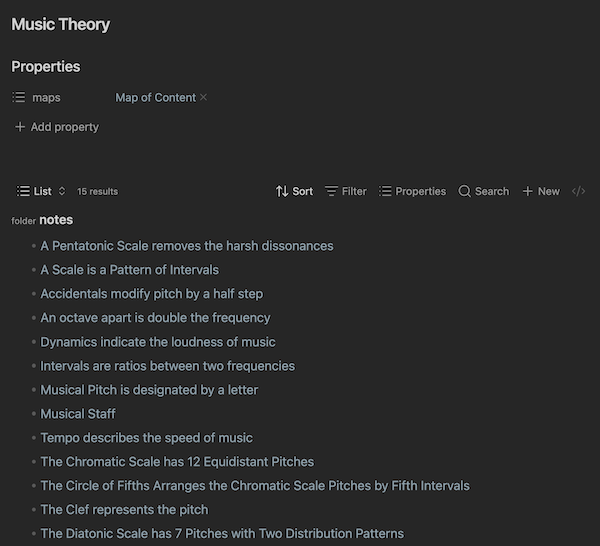
This solution lets me open any Map of Content and be sure that its listed contents are always up to date, with very little manual overhead. Adding a note to a map is essentially just a case of tagging it, which is performed while that note is open. No jumping to another file, opening up another context window, purely for administrative overhead. A keyboard shortcut (⌘+;) to insert a new File Property is all that's needed!
Here's a fully-rendered example from my actual Obsidian vault:
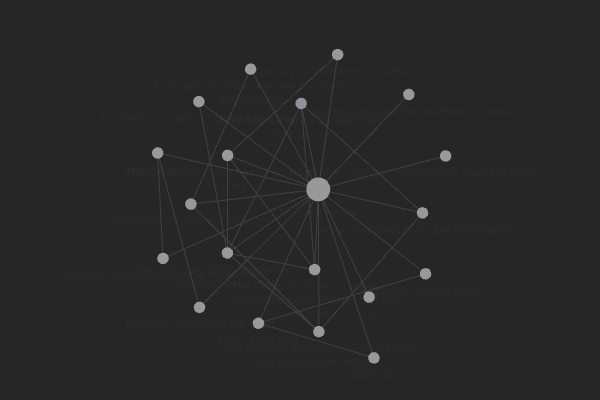
And don't worry - Obsidian is clever enough to keep this in sync with Graph View:
Conclusion
Obsidian is a note-taking Swiss Army Knife, its versatility makes it powerful but comes with a complexity cost. I'm rather conservative in how I use Obsidian - the features I adopt, the plugins I've installed, because I want to keep the setup as simple (and therefore as portable) as possible. Templatable bases make sense as a trade-off, investing in a one-time setup activity in order to bring down the cost of keeping up with note organisation later. As with any 'productivity'-related solution, your mileage may vary. This works for me, for now. There's no right or wrong way to use this stuff.